Ashutosh Bhatt
Is This Website Safe? How To Check Before You Click?
Get to know how you can spot fake websites, detect phishing scams, suspicious URLs, and online shopping frauds before entering payment details online.
800,000 people scammed, 476,000 debit and credit card details leaked, 76,000 fake brand websites created. And you are still wondering why your Versace was not delivered to your doorstep despite ordering it from the official website. Yes, there is a possibility for this because the versace.com that you clicked might not be the official website.
The logos, fonts, layout, everything on the website might appear the same and a lay man will not notice what some security platform could detect for you and save you thousands of dollars. Let’s talk about the ‘Chinese fake marketplace e-commerce phishing campaign’ which happened last year.
Chinese fake marketplace e-commerce phishing campaign scam
As per Guardian, around 800k people in the US and Europe lost their funds assuming they were placing orders to brands like Dior, Versace, Prada with websites looking exactly like originally are. It does not stop here!
To add to the authenticity, they created these websites in multiple languages be it English, Italian, French, German etc. Who would have thought that they need to be so alert while placing orders to such huge brands and question themselves ‘is this website safe?.
Katherine Hart, who is a leading officer at the Chartered Trading Standards Institute, described the operation as “one of the largest online fake shop scams that I have seen”.
All this summed up to a loss of 50 million euros. You might be thanking god that you were not a part of this but to make sure you are never a part of this, you need security.
Melanie Brown shares her experience about the scam
Melanie Brown from Shropshire, England, was just doing what most of us do on a Sunday afternoon, browsing online for a good deal.
She came across a leather handbag from her favourite German designer, Rundholz, listed at 50% off. She kept adding more designer pieces from Magnolia Pearl and other items which if one leaves in a good sale might regret not buying later. During the checkout, her cart had 15 items worth £1,200 which is approximately $1,529.
She placed the order which never got delivered to her. Melanie Brown was not naive or careless. She was a regular person doing online shopping on a website that looked exactly like the original one and that is exactly the point. If it can happen to her on a £1,200 cart, it can happen to anyone on any amount. But how did all this operate? Let’s find out!
How did the scam work?
Most people assume a fake website scam means you pay and get nothing. But this operation ran a far more calculated two-level trap which made it more dangerous.
Started with the data harvest
Some of the fake payment gateways collected card details without actually charging anything. Victims felt nothing had gone wrong as no money was deducted. Meanwhile, the information wit the respect to the full card number, CVV, name, and billing address were already with the scammers.
Then the wrong item was delivered
Some victims did not receive what they ordered. A German shopper who paid for a blazer received cheap sunglasses. A British customer got a fake Cartier ring in place of a shirt they had ordered. Another received a plain blue jumper instead of the Paul Smith one they had paid for.
And the numbers tell you just how large this operation was. A scam of 50 million euros has happened since 2015, in just three years almost 1 million orders were processed.
The scariest part? Katherine Hart, Lead Officer at the UK’s Chartered Trading Standards Institute (CTSI) warned that "these people often belong to serious and organized crime groups, so they collect data and might use it against their victims later, making consumers more susceptible to phishing attempts."
How do scammers make a fake website look so real?
Obviously, once you are out of the trauma or dealing with the trauma scam, this question will come to your mind. Here is exactly what goes into making a fake website convincing enough to fool hundreds of thousands of people:
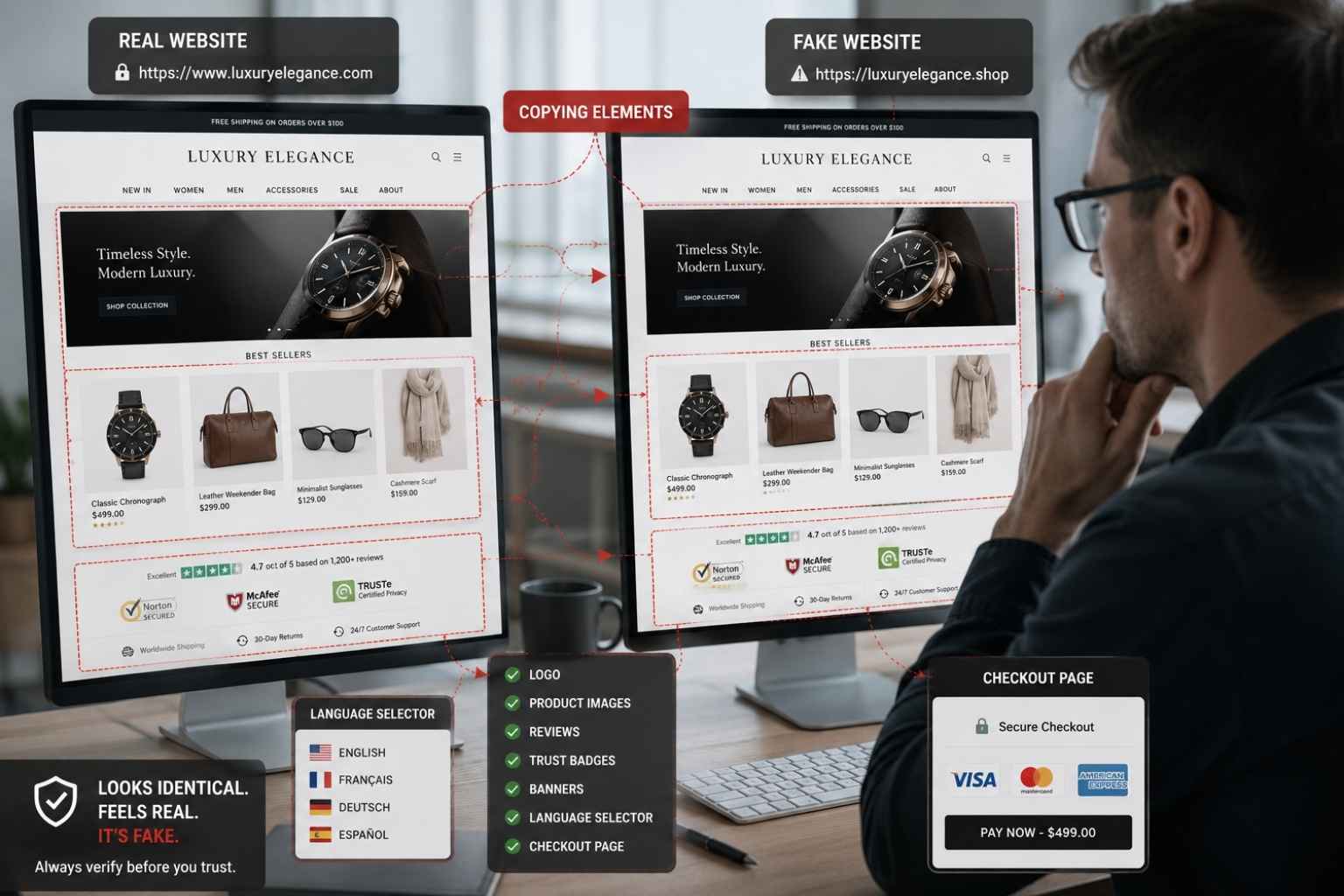
Clone the design pixel by pixel
Logos, fonts, color codes, product images, page layouts, all of it is lifted directly from the real brand website. The international investigation that cracked this particular scam found over 22,500 fake online shops running simultaneously, all designed to pass a quick visual inspection.
Using different language options in the website
Say you are a German and the website shows up with an option to see it in German, who will think that this could be a scam with such details being taken care of that a fake website can be converted into different languages?
Irresistible Offers
These could look like getting a Versace at a lavish discount of 65% or a Dior bag with zero shipping charges. Scammers use such techniques and play with human psychology.
Tricking you with the URL
People who are into cybercrime often play with the url because hardly anyone pays attention to it. Instead of versace.com , you might end up clicking on versace.shop or versace.top or anything weird but identical to the main website. This is also known as typosquatting.
Using the padlock icon to create a false sense of safety
Here is something most people still get wrong. That green padlock in your browser does not mean the website is safe. It only means your connection to the site is encrypted. The whole website can be fake but still appear as if it’s safe. In fact, according to research, approximately 80% of phishing websites now feature HTTPS, making them appear secure at first glance.
7 Red flags to check if a website is safe
You do not need to be a cybersecurity expert to protect yourself. Right before you enter your card details and hit checkout, make sure you:
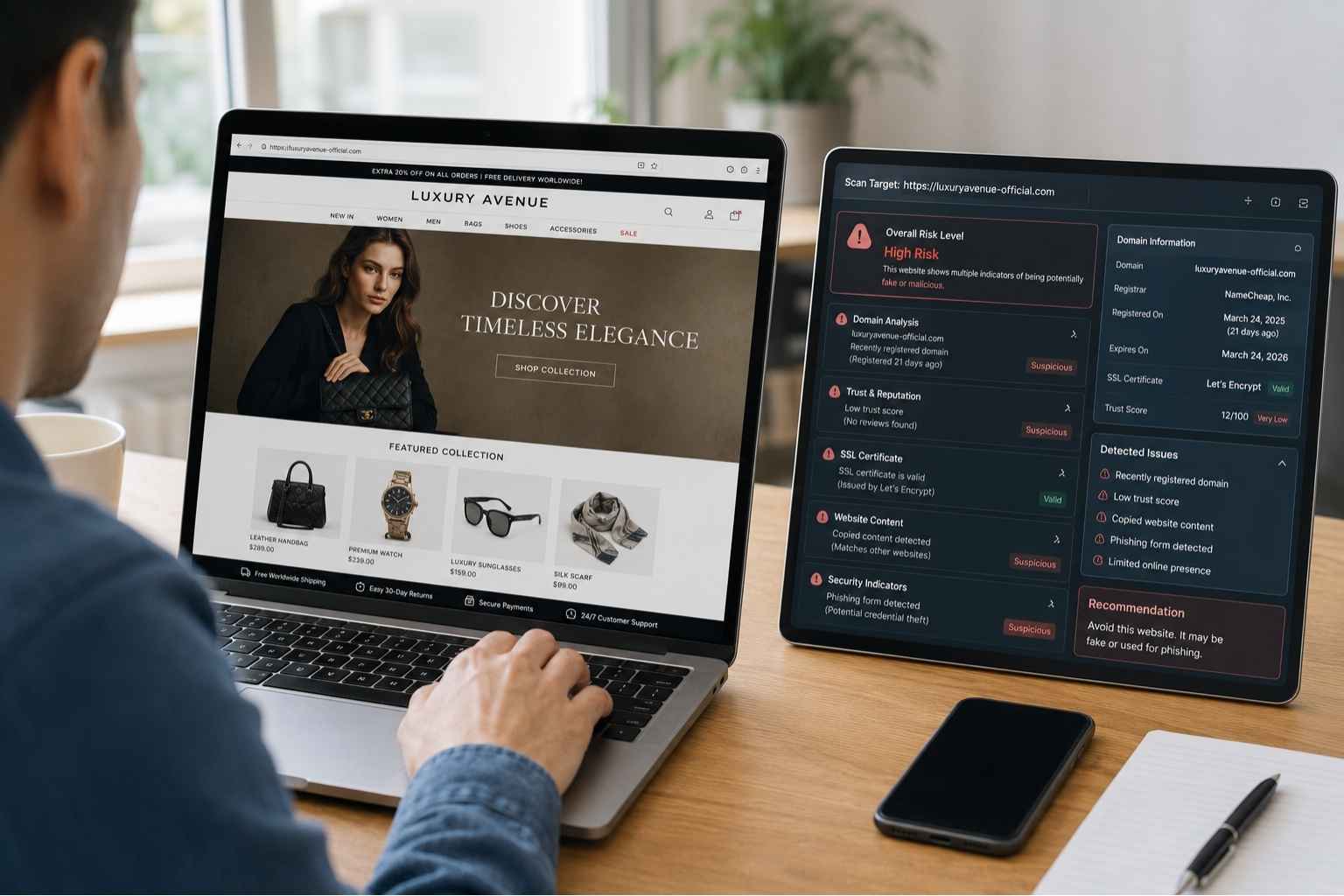
Read the URL
Versace.com and vers4ce.com look nearly identical on a mobile screen. Look carefully for extra words, swapped letters, hyphens, or unusual endings like .shop, .store, .top, or .vip. If the domain feels even slightly off, don’t proceed.
Remember that a green padlock is not always ‘safe’
As covered above, HTTPS is not proof of a legitimate website. It only confirms that your data is encrypted in transit, not that it is going somewhere safe.
Look up the domain’s age
Tools like Whois.com let you see exactly when a domain was registered. A luxury brand website created three months ago is a serious red flag. Established brands have domains that are years old.
Check whether the discounts seem realistic
Authentic Dior, Prada, and Versace websites do not run 70% off sales. Scammers use extreme discounts specifically because they override rational thinking. If the deal feels too good to be true online, that instinct is usually right. Hence, trust what you feel.
Look for a real contact page
Fake websites either have no contact details at all or list generic email addresses that do not match the brand domain. A legitimate brand website will have official support channels clearly displayed.
Google the brand's official website
Rather than clicking a link you found in an ad or email, search the brand name directly in Google and verify the URL before you open your wallet.
Don't let countdown timers pressure you
"Only 2 left in stock!" and "Sale ends at 00:18:30!" These countdown timers and scarcity messages are standard tools scammers use to push you into acting before you think.
Your data is the real product
Here is the part that should concern you even if you noticed the scam in time and closed the tab. The moment you landed on that fake website, your IP, browsing behaviour, and even what you searched for were already captured. If you entered your name, email, or phone number before leaving the site, that information may already be in the hands of scammers.
Jake Moore, a global cybersecurity advisor at ESET, put it plainly to The Guardian:
"Data is the new currency." He warned that the personal data accumulated through scams like this could even be valuable to foreign intelligence services for surveillance purposes.
This is the part that most people do not think about until the damage is done. You are not just risking one transaction. One click can keep giving scammers access to your life for months.
All the data goes to work, it powers future phishing emails that address you by your real name, SMS scams that reference your actual home address, and account takeover attempts across your banking and email. The FTC reported that in 2024, Americans alone lost $12.5 billion to online fraud ,up $2.5 billion from the previous year ,with over $3 billion of that originating from scams that started online.
Where Vault steps in
This is exactly the gap Vault was built to close. Most people rely on instinct when they shop online.
Vault works in the background, in real time. The moment you land on a risky or suspicious website, it flags it, before you type a single letter of your card number or enter your email, before and become a data point in someone's fraud operation.
Vault's website risk detection analyzes the page as you browse and surfaces a clear, simple alert in plain language. You will not see a list of technical warnings that leave you confused. The Vault browser extension is currently available on Chrome, Brave, and Microsoft Edge. The mobile app for Android and iOS is coming soon.
Handle your 'Is this website safe' situation better next time!
So the next time you are about to order something from a website that showed up in an Instagram ad, a WhatsApp forward, or even a Google result, pause for 60 seconds. Check the URL. Google the brand independently. Question that 60% discount. And if you are shopping on Chrome, let Vault do the check for you in real time.
Because 800,000 people across the US and Europe did not pause. And most of them never got their order.
Frequently Asked Questions(FAQs)
Q: How will I get to know if a website is fake?
Just do a quick check of the following:
URLs are usually misspelled.
There might be some extra hyphens in the URL.
Domain ending with .shop or .top.
Search the website on your individual Google browser by the brand name. Rather than clicking on the link sent by someone directly.
Check how old that domain is, and if it's newly made it's a red flag.
Q: Does having a padlock on a website an indicator of safety?
There is a huge difference between privacy and safety. So, when you say padlock makes the website safe, it’s a big no, does it give privacy, yes it does. In other words, padlock only provides encryption to the website.
Q: You already entered your card details on a malicious or suspected website, is there a way out?
First things first, call your back and ask them to block your card as soon as possible. Check for the possibility of a chargeback. If you are sharing similar passwords for any account related to the email address that you put on the website where you put your card details, change it immediately. Keep a check on your inbox and SMS closely for phishing follow-ups that may use your real name or address, scammers often re-target victims they already have data on.
Q: In the age of Instagram and WhatsApp ads, is it safe to click on shopping links or ads that I see there?
Scammers are everywhere, hence you have to be very careful. They definitely use social media platforms so that they can redirect you to the fake websites they created with attractive offers specially on big brands. So, you should definitely verify the URL before adding any sensitive information. To avoid the hassle, installing Vault will do the job for you by detecting and showing the right alert (only if needed). It does not trouble you with the right notifications, only alerts you with the wrong ones.
Q: How is Vault different from just being careful while browsing?
Being careful helps, but attention has limits, especially on mobile where URLs are truncated, discounts feel urgent, and one tap is all it takes. Vault runs automatic real-time checks on every website you visit, so you do not have to manually catch every red flag yourself.
Q: Is Vault available on all browsers?
The ones that you majorly use, especially Chrome, you can definitely find Vault there. It is also available on Brave and Microsoft Edge.






AI-native digital protection platform for modern users.






© 2026 Vault Security. All Rights Reserved.